



Have you been scammed into transferring money, received calls from people impersonating police officers, or been sent messages containing suspicious links? You can report this directly to the police through the VNeID app.
Starting from version 2.2.8 (released June 13, 2026), VNeID includes a feature to report online fraud. The information you submit will be forwarded to the police's receiving system for verification and processing according to regulations.
This channel is particularly convenient for the elderly, those who live far away, or those with mobility difficulties. Each report also helps authorities to quickly identify new tactics and warn the entire community.
What to prepare before giving a report?
Required condition: VNeID account Level 2 identification And the app has been updated to the latest version from Google Play or the App Store.
Gather the following information in advance to fill out the form quickly and correctly:
- Time of occurrence: Date and time of contact or money transfer.
- How the recipient contacted them: Calls, SMS messages, Zalo, Facebook, websites, unfamiliar apps…
- Subject information: Phone number, social media account name, link, bank account number for receiving money.
- Your trading account: Bank account/e-wallet used to transfer money (if any).
- Amount of money stolen (VND).
- Proof: Screenshots of text messages, transfer receipts, and call recordings.
Tip: Take a screenshot of the entire chat before the other person has a chance to delete or block you.
5 steps to report fraud on VNeID
Open the VNeID app and log in using your level 2 identification account, then follow these steps.
Steps 1 and 2: Open the feedback section.
- On the homepage, under the Services Groups section, click Other services.
- In the Other Services tab, select Receiving feedback, suggestions, and concerns..

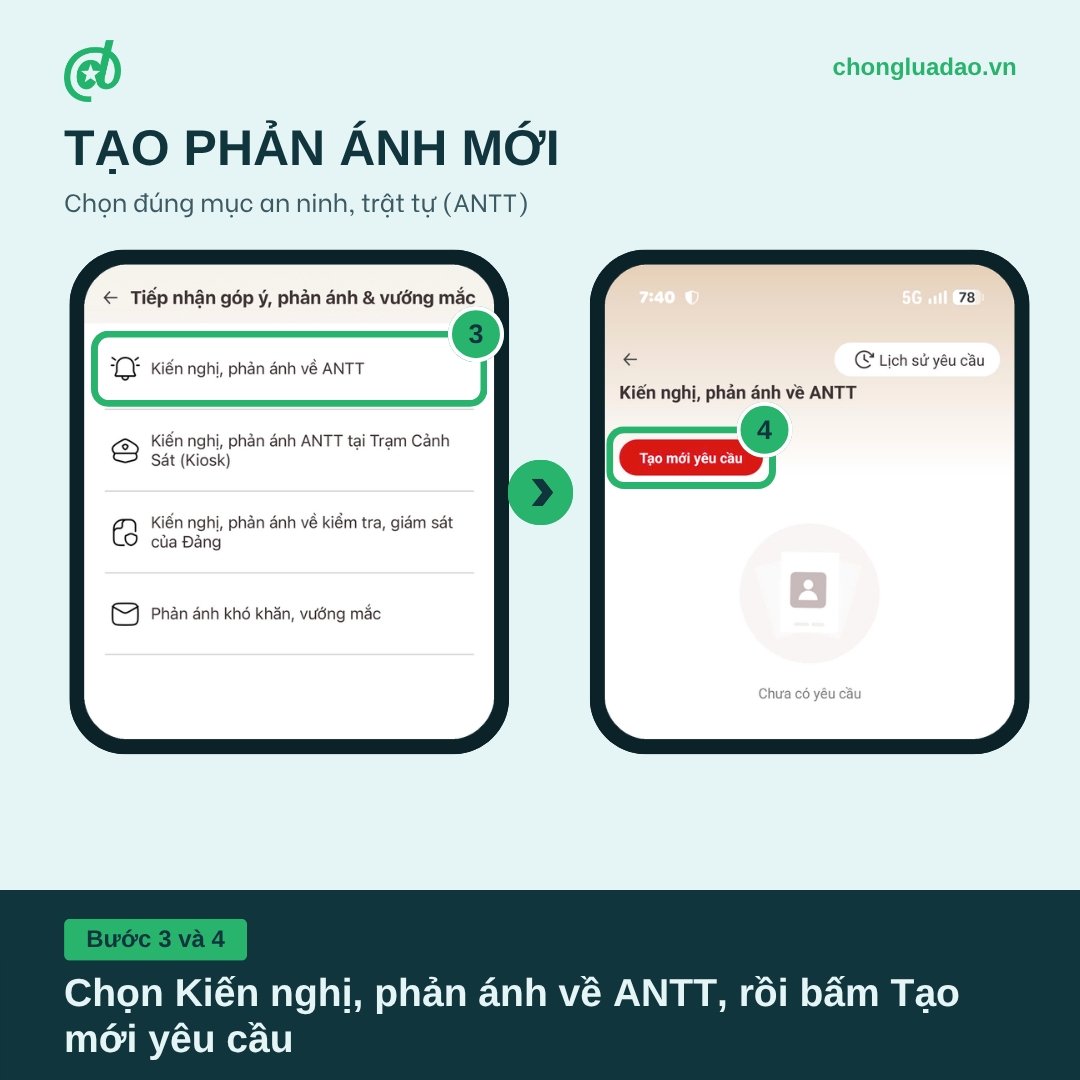
Steps 3 and 4: Create new reflections
- Select Suggestions and feedback regarding security and order. (First line). Please be careful not to mistakenly select the Kiosk or Party inspection/monitoring items.
– Press the red button Create a new request. Button Request history In the top right corner is where you can review the feedback you've submitted.
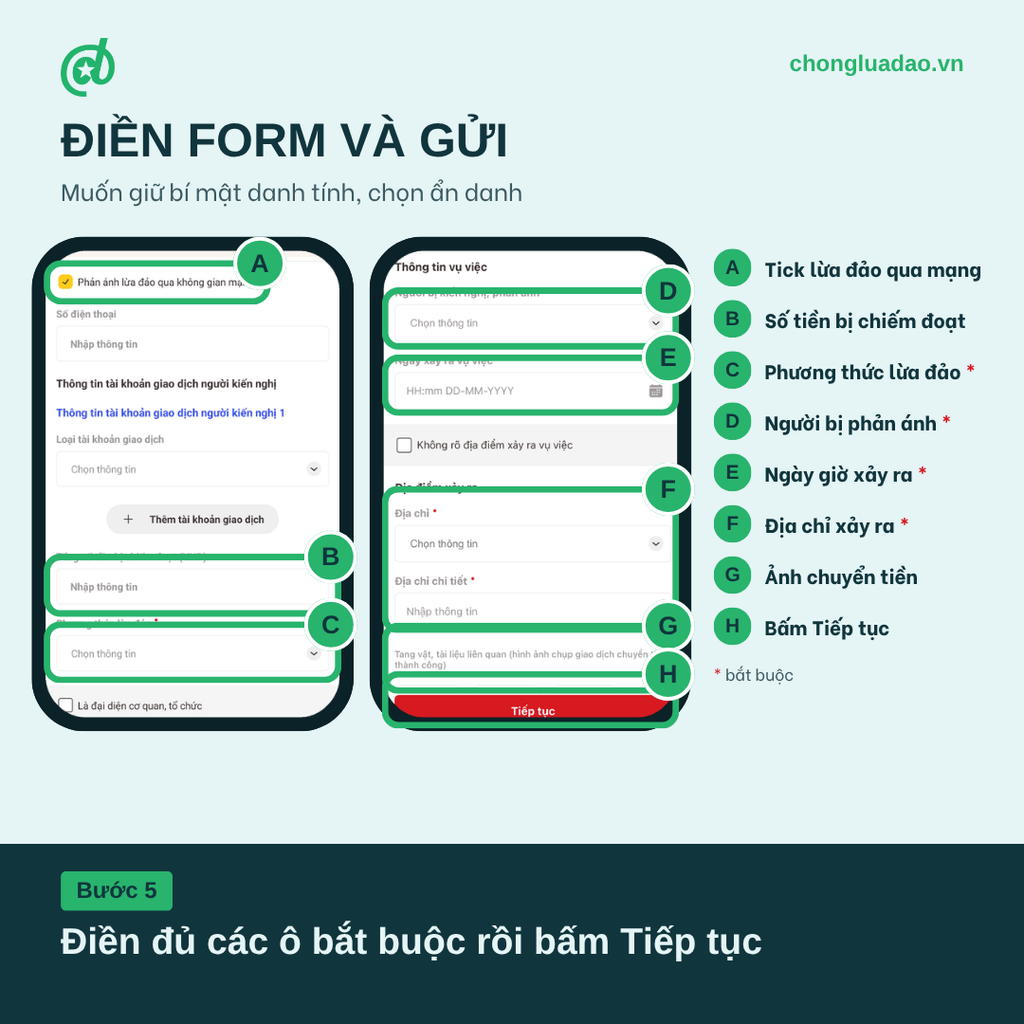
Step 5: Fill out the form and submit.
Check the available petitioner information. If you wish to keep your identity confidential, select anonymous. Then fill out the form in order from top to bottom:
- Tick the box Reporting online fraud.
- Enter the total amount stolen (VND) and the account used to transfer the money. Click "Add transaction account" if transferring from multiple accounts.
- Select scam methods (obligatory).
- In the Incident Information section, select person being petitioned against or criticized. (obligatory).
- Import date and time of the incident in the format hour:minute day-month-year (required).
- Select Address and import detailed address Location where the incident occurred (required). If you were scammed online and don't know the perpetrator's location, tick this box. The location of the incident is unknown..
- Attachments evidence and related documents, especially screenshots of successful money transfer transactions and screenshots of text messages with the target.
- Press Continue.
- The application will display all the information you just entered. Check carefully and tick the box. “"I take full legal responsibility for the content of the report above."”, then press Submit a request.
Upon successful submission, you will receive an acknowledgment notification and can track the processing progress directly on VNeID. If you encounter difficulties, please call the VNeID support hotline of the Ministry of Public Security. 1900 0368.
After submission, here are some important notes.
Monitor processing progress at the node. Request history on the screen "Suggestions and feedback on security and order".
- Money has been lost: Immediately call the bank's hotline to request that the receiving account be frozen, and simultaneously report the incident to the nearest police station. Reporting through VNeID is an additional channel, not a replacement for reporting directly in case of significant losses.
- Provide truthful and complete information: The clearer the information, the faster the police can verify it.
- The police do not conduct business over the phone or via social media. Any calls requesting activation, "fixing" VNeID errors, or sending application installation links are fraudulent.
- Only download VNeID from Google Play or the App Store., Do not install via links sent by strangers.
The whole nation is fighting fraud: save this article and share it with your loved ones, especially your grandparents and parents.
 English
  Vietnamese